

Faceted navigation SEO means controlling which filtered product URLs search engines crawl and index. As part of our ecommerce SEO services, we assess filter-generated URLs and plan appropriate crawl and indexation controls. Keep useful, demand-led category combinations indexable; consolidate genuinely duplicate listings; and restrict low-value filter combinations. If unwanted URLs are already indexed, let Google read their noindex directive before considering crawl restrictions.
Why filters create an SEO problem
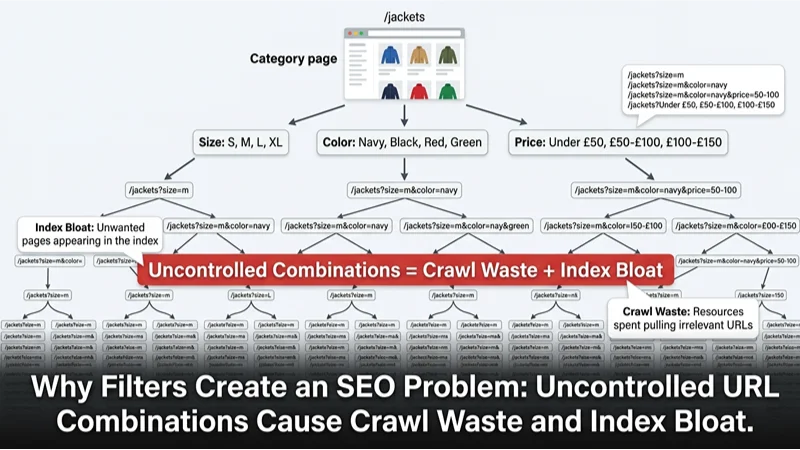
A shopper selects waterproof jackets, size medium, navy, and under £100. That’s useful navigation. But each selection, sort order, and alternative parameter sequence can create another discoverable URL. Google warns that these URL spaces can cause over-crawling and slow discovery of useful pages. The problem isn’t filters themselves: it’s giving crawlers an uncontrolled catalogue of combinations.
It helps to separate two problems: index bloat and crawl waste. Index bloat means unwanted filter pages appearing in Google’s index. Crawl waste means crawler resources spent fetching low-value URLs. A robots.txt rule restricts crawling; it doesn’t remove a URL from search results, and a blocked URL can still appear if Google finds links to it. Google’s crawl budget guidance is aimed mainly at very large or fast-changing sites, but filters can turn a modest catalogue into a very large URL space.
Faceted navigation SEO: choose the right control
Use this decision table before changing templates. Its examples are illustrative, not client results.
| URL type | Example | Preferred treatment | Main caution |
|---|---|---|---|
| Valuable category subset | /boots/womens-waterproof/ |
Allow indexing; self-canonical | Validate demand and stock. |
| Duplicate presentation | ?view=grid |
Canonical to equivalent listing | Content must genuinely match. |
| Unwanted indexed filter | ?size=7&price=50-75 |
Crawlable noindex | Blocking prevents Google from reading it. |
| Unwanted crawl space | Endless multi-filter combinations | Targeted robots.txt restriction | Protect valuable exceptions. |
| Empty or invalid combination | Impossible size/material pairing | Return HTTP 404 | Don’t redirect to a shared error URL. |
| Valid pagination | ?page=2 |
Unique URL and self-canonical | Don’t canonicalise everything to page one. |
In short, Google’s faceted navigation guidance points to robots.txt (or URL fragments) when filtered URLs don’t need crawling, canonicalisation when pages genuinely duplicate one another, and 404 responses for empty or invalid filter combinations. For paginated category pages, each page should have its own URL and a self-referencing canonical.
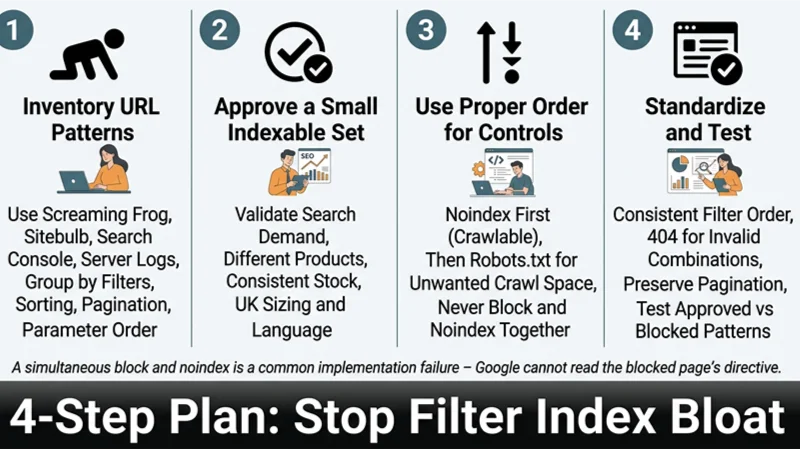
How to Stop Filter Index Bloat: 4-Step Implementation Plan
1. Inventory the URL patterns
Crawl a few representative categories using Screaming Frog or Sitebulb, then compare the findings with Search Console and server logs. Group URLs by filters, sorting, pagination, and parameter order. Check status codes, canonical targets, indexability, and internal links. If Search Console flags important category or product pages as crawled currently not indexed, investigate those separately from unwanted filter URLs. Don’t rely solely on a crawl: Google may know about historical URLs that your current navigation no longer exposes.
2. Approve a small indexable set
Select combinations with recognisable search demand, distinct products, and consistent stock availability. Consider language and sizing explicitly for a UK shop: women’s waterproof walking boots and UK sizes may matter more than a generic colour combination. Give approved pages a unique title, a clear heading, and internal links. Never build landing pages that are almost empty just because a keyword exists.
3. Use controls in the right order
For URLs you want removed from the index, keep them crawlable and serve <meta name="robots" content="noindex"> (or an X-Robots-Tag: noindex HTTP header). Check that Google has seen the directive before adding crawl restrictions later. For unnecessary crawl spaces, test targeted robots.txt rules. Blocking a URL while relying on its noindex is a common implementation mistake: Google can’t read a directive on a page it isn’t allowed to crawl. If certain filters never need to be crawled, Google also notes that filters held in URL fragments (for example #colour=navy) don’t affect crawling, although that’s usually a build decision rather than a quick fix.
4. Standardise and test
Use consistent filter ordering, prevent repeated facets, and use the standard & parameter separator. Return proper 404 responses for invalid or empty filter combinations. Preserve crawlable pagination and product discovery routes. If you run Shopify, WooCommerce, or Adobe Commerce (Magento), check which URLs your theme or filter app generates by default. Test approved landing pages alongside blocked patterns: one broad parameter rule can accidentally close access to pages you intended to keep.
Implementation checks before release
- Test the same selection in different orders. Equivalent states shouldn’t multiply into inconsistent URL variants.
- Check rendered HTML as well as source HTML when JavaScript manages filters.
- Keep product discovery available through crawlable category and pagination links, not just interactive controls.
- Maintain a documented exception list for commercially valuable facets before introducing pattern-based restrictions.
Google generally discovers links through <a href> elements and doesn’t click “load more” buttons as a shopper would. That makes product discovery a separate testing requirement, not an assumed side effect of fixing filters. An up-to-date XML sitemap or a Google Merchant Center feed can also help Google find every product.
Frequently asked questions
What is faceted navigation in SEO?
Faceted navigation (also called faceted search, filtered navigation, or layered navigation in Magento) lets users filter product lists by attributes such as brand, size, colour, and price. The SEO implications arise when those selections generate crawlable URLs. Useful combinations can become search landing pages, while unrestricted combinations can create a huge URL space that wastes crawl budget.
Should Google index filter URLs?
Usually not. The exception is where the filtered view is valuable as a search landing page, so weigh demand, product differentiation, and stock stability. Don’t standardise on a one-filter or two-filter cut-off. Parameter URLs aren’t a problem in themselves, as Google’s crawlers learn how to handle parameters automatically. What matters is controlling how filter URLs are created and deciding which filtered pages are worth crawling.
Should I use a meta tag or robots.txt for filters?
They solve different problems. Use a noindex meta tag to keep an accessible page out of search results while Google can still crawl it and follow its links. Use robots.txt to prevent needless crawling. If the URL is already indexed, blocking it first can stop Google from seeing the noindex it needs to drop the page.
Should filtered pages canonicalise to their parent category?
Not automatically. Canonicalisation can consolidate equivalent or sufficiently similar listings, but it isn’t a universal filter-removal mechanism. A valuable subset may deserve its own indexable page instead. Google also notes that canonical signals are generally less effective for controlling faceted crawling than directly preventing unnecessary URL access.
How do I check ecommerce index bloat?
Compare your intended landing-page inventory with Search Console’s Page Indexing report, then inspect representative unwanted URLs. Check whether Google encountered noindex and whether crawling is blocked. Combine that evidence with crawl exports and logs: the number of discovered URLs alone doesn’t establish how many unnecessary pages remain indexed.
Can I still use Search Console’s URL Parameters tool?
No. Google retired the URL Parameters tool in 2022, and many older guides still recommend it. Manage filter URLs through robots.txt rules, noindex, canonicalisation, and consistent URL generation on your platform instead.
What should empty filter combinations return?
Google recommends HTTP 404 for filter combinations returning no results, duplicate filters, nonsensical combinations, and nonexistent pagination. Return the status at the requested URL rather than redirecting everyone to one error page. Distinguish these generated combinations from permanent categories whose stock has temporarily disappeared.
Should page two canonicalise to page one?
No. Google recommends a unique URL and self-referencing canonical for each page in a paginated sequence. Page two usually contains different products, not a duplicate of page one. Keep sequential crawlable links so restricting filter URLs doesn’t leave deeper products dependent on interactive navigation alone.
What to do next
Start with one category: inventory its URL patterns, approve valuable facets, and then test exclusions before expanding. If your store needs wider support beyond filter URLs, our UK SEO and web development agency brings technical planning and implementation together.


Be the first to leave a comment below.