
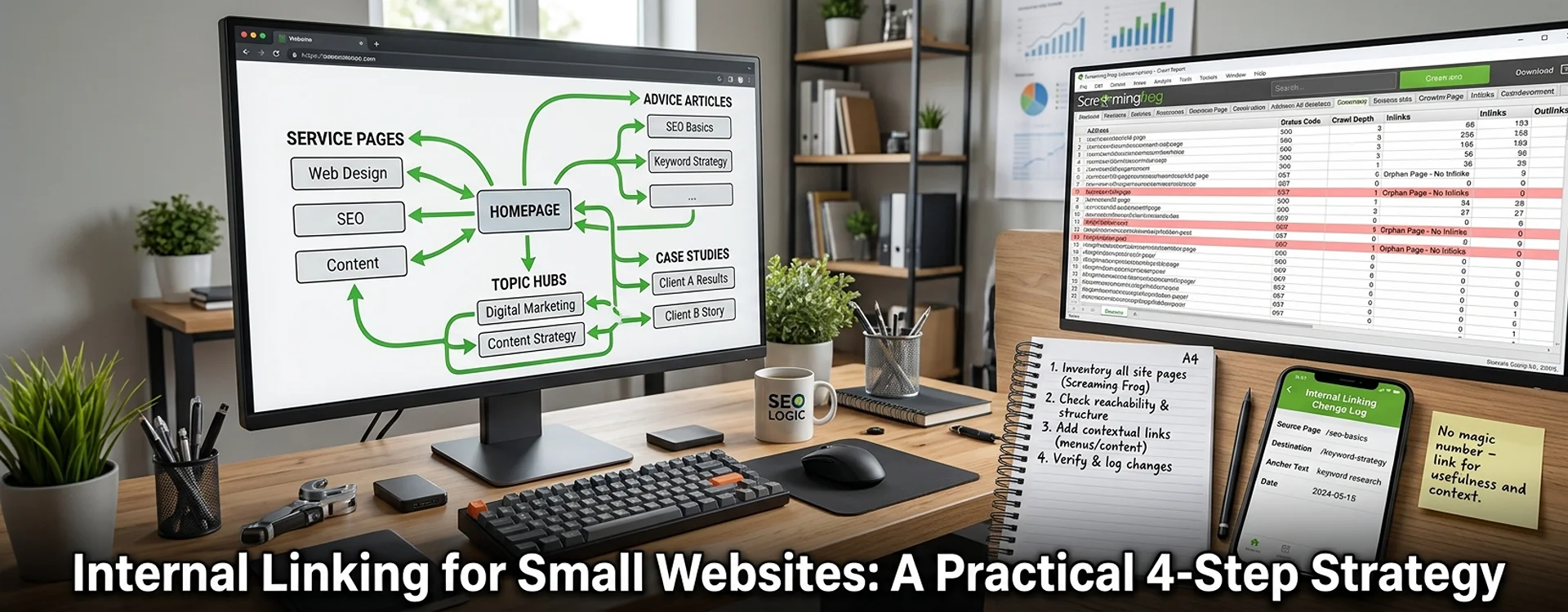
A website with 100 pages or fewer still needs an internal linking strategy: a plan that connects related content, makes important pages easy to reach and leaves no valuable page isolated. Start with a page inventory, organise your topics around useful hubs, then add informative contextual links where readers naturally need the next explanation or service.
Plan your internal links around reader journeys
A simple website does not need a complex architecture, but it does need a clear plan. Internal linking is one of the core parts of on-page SEO services, because it helps readers reach the next useful page and helps search engines understand how your content connects. For a UK accountancy practice, those pathways might link a self-assessment guide to a tax return service, or a bookkeeping article to a checklist. Use navigation for your main destinations and contextual links for the reader’s next question. Google’s link guidance recommends descriptive, crawlable links so that people and search engines can find related pages.
A hub-and-spoke (or topic cluster) structure connects a pillar page to its supporting content. An SEO silo approach follows a similar idea of theming and grouping. But don’t turn categories into barriers: a genuinely useful link belongs on the page, even if it points outside the topic.
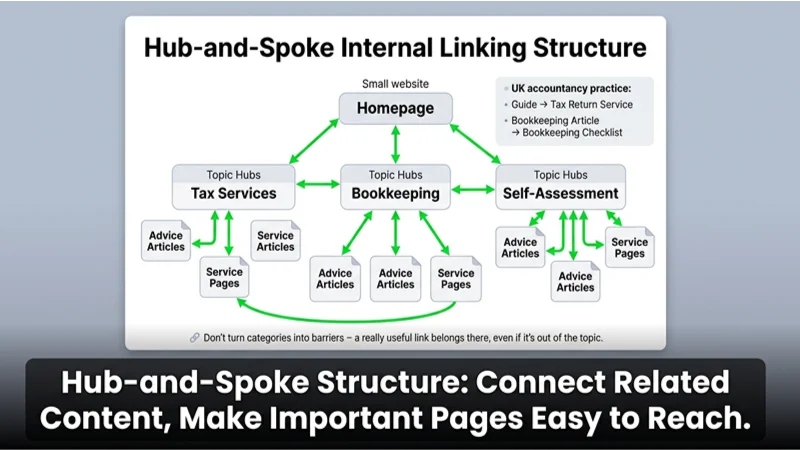
Use this planning matrix:
| Page type | Main job | Useful outgoing link | Useful incoming source | Avoid |
|---|---|---|---|---|
| Homepage | Orient visitors. | Main services or hubs | Site navigation | Listing every article |
| Service page | Explain an offer. | Relevant evidence or guidance | Related advice articles | Unrelated sales links |
| Topic hub | Organise a subject. | Supporting resources | Navigation and articles | Empty category pages |
| Advice article | Answer a question. | Next explanation or service | Hub and related articles | Forced anchor phrases |
| Case study | Demonstrate relevant work. | Service discussed | Relevant service page | Unsupported results |
This is an editorial framework, not a required linking pattern for every page.
How to improve internal linking: 4-step implementation plan
1. Inventory pages and identify priorities
Get your published URLs from your CMS, then crawl the site as the first stage of an internal link audit. Record each page’s topic, purpose and target URL in a spreadsheet. Mark your key services and most useful resources as priorities. Screaming Frog’s free version can crawl up to 500 URLs per crawl, although a small site may exceed that because of technical URL variations.
2. Check reachability before adding more links
Examine the crawl depth and incoming links of your important pages. As a practical audit guideline, aim to keep key destinations within one to three clicks of the homepage. This is a rule of thumb, not a Google ranking threshold. Google Search Console’s Links report can also show which pages on your site receive the most internal links. Resolve hidden pages before adding decorative “related reading” sections. If a page is being crawled but still isn’t appearing in search, this guide on crawled currently not indexed pages can help you rule out the common causes.
3. Add links at the decision point
Go through each page and ask what the visitor needs next. Place the link beside that explanation, with concise anchor text that describes the destination. Use crawlable HTML links, like this:
<a href="/bookkeeping-services/">bookkeeping services</a>Links that depend on JavaScript click handlers without a proper href may not be crawlable. Avoid vague wording and long strings of links that promise more than they deliver.
4. Verify links and record changes
Run the crawl again to confirm the links exist. Keep a simple change log with the source page, destination, anchor text and implementation date. Check whether existing related pages can link to your new content: if you only link from the new page to older ones, the new page may have no incoming links.
How many internal links should each page have?
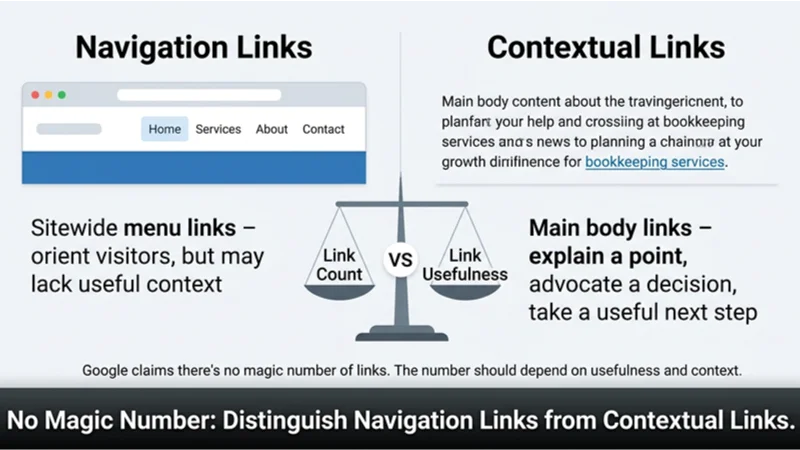
There is no ideal number. Google does not set a required number of links, so the right amount depends on usefulness and context. A short contact page and a long topic hub serve different purposes, so the same quota makes no sense for both.
When optimising your website with internal links, first distinguish navigation links from links in the main body content. A page may have sitewide menu links and still lack useful context. When evaluating performance, don’t rely on total link count alone; audit both.
Suggestions for implementation
- Compare your crawl against your CMS inventory. A crawl that starts at the homepage won’t find a page that isn’t linked from anywhere.
- Check the destination before choosing anchor text. The anchor should describe what readers will find there.
- When you publish, check links in other content, not just on the new page.
- Keep useful cross-topic links rather than enforcing a silo boundary at the reader’s expense.
Frequently asked questions
How many internal links are ideal on a web page?
As many as the page genuinely needs, and no more. Google does not publish a minimum or maximum number of internal links per page. Keep links that explain a point, support a decision or offer a useful next step, and remove links added only to hit an SEO target.
What type of structure works best for a small website?
Start with clear navigation and useful topic hubs, linking to relevant pages naturally. Make sure key destinations are easy to reach. Don’t add structure just because larger competitors have it; your structure should reflect your visitors and your content.
How do I find orphan pages?
Compare your inventory of published pages with the URLs your crawl discovered by following internal links. An orphan page is one that can’t be reached through those links. Sitemap data and other URL sources can help you identify candidates. Check whether you want the page to stay public before linking to it.
Should I use exact-match keywords in internal links?
Use words that naturally describe the destination. An exact-match phrase is fine now and then, but not repeatedly. Google’s guidance asks for descriptive, concise anchor text, so avoid stuffing it with keywords. An anchor such as “self-assessment deadlines” tells both readers and search engines far more than “click here” or a clumsy string of tax jargon.
Should I nofollow internal links?
Ordinary editorial links between your useful pages generally don’t need it. Google describes that attribute for situations where you don’t want Google to associate your site with, or crawl, a linked page. Don’t apply it routinely to internal links as a substitute for organising your website properly.
How can I measure whether the changes work?
First verify implementation: can the crawler reach your priority pages, and do the intended incoming links exist? Then review relevant search and conversion trends using your existing reporting. Keep the change log, because other edits and demand changes can affect results; a ranking increase alone doesn’t establish causation.
Your next actions
Start your internal linking strategy with ten important pages. Identify missing connections, update relevant existing content, then crawl again. If you would like expert help reviewing your site structure, the team at Webranko, a UK SEO and web development agency, can support you.


Be the first to leave a comment below.