

If you read one paragraph only, the London web design trends worth your budget in 2026 and 2027 are clear. They include accessibility from day one. They focus on real page speed, not just surface polish. They use AI personalisation that stays within GDPR. They also structure content so AI assistants can read it accurately for visitors. Bold type and dark mode are still everywhere, but they’re the finish, not the foundation.
The trends worth your budget, and the ones to skip
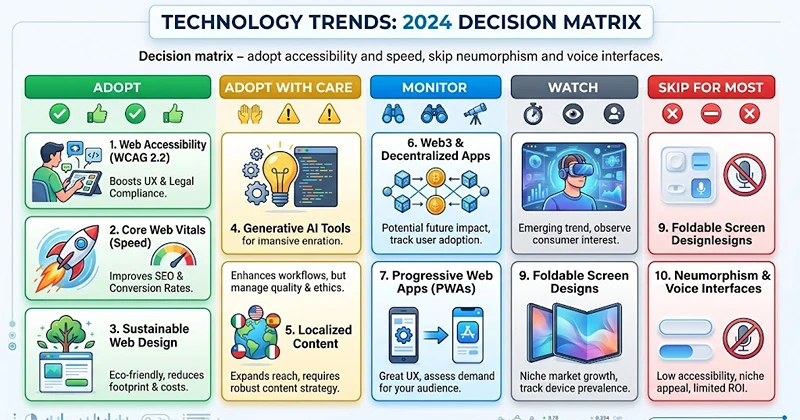
Most trend lists give twenty ideas equal weight, from glassmorphism to voice search to spinning 3D product viewers. That’s not much use when you’ve got a fixed budget and one shot at a redesign. Here’s a decision matrix built around what actually changes outcomes for a UK business site, rather than what wins design awards.
| Trend | Verdict | Why |
|---|---|---|
| Accessibility (WCAG 2.2 AA) | Adopt | Legal duty for public sector, genuine reputational and commercial risk for everyone else |
| Core Web Vitals / page speed | Adopt | Directly tied to Google ranking and to whether visitors actually stay |
| AI personalisation | Adopt with care | Effective, but only with clean data and a proper GDPR footing |
| Content structured for AI agents | Adopt early | Still a minority practice, so early movers get noticed first |
| Mobile first layout | Adopt | Most UK site traffic is mobile, and Google works from the mobile version of a page |
| Dark mode | Monitor | Pleasant addition, but not a ranking or conversion driver by itself |
| Bold, expressive typography | Monitor | Fine as a brand decision, limited functional impact |
| 3D and WebGL product viewers | Watch | Genuinely useful for retail and property, overkill for most service firms |
| Neumorphism and heavy glass effects | Skip for most | Low contrast tends to work against the accessibility goals above |
| Voice interface on content sites | Skip for most | High build cost against thin UK consumer demand outside smart speakers |
Accessibility has stopped being optional
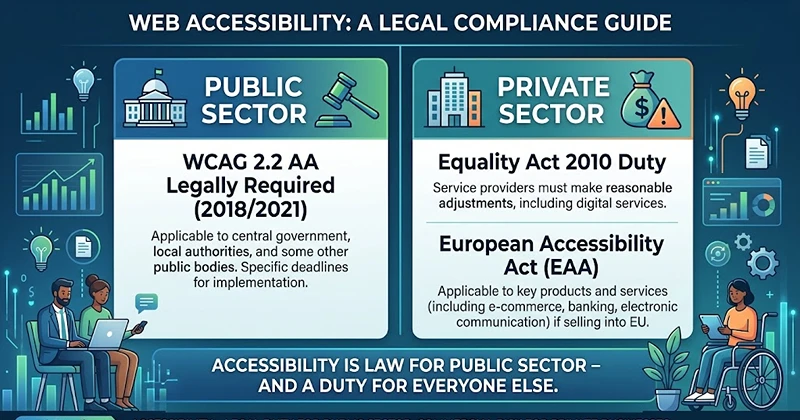
For public sector organisations, this one isn’t really a trend at all; it’s law. Websites and mobile apps run by government departments, local authorities, universities, and the NHS must meet WCAG 2.2. They must meet level AA under regulations that came into force in September 2018. For apps, the regulations came into force in June 2021. The Department for Education’s own accessibility standards guidance confirms this duty applies to anything a user accesses through a browser or app, with WCAG 2.2 as the technical benchmark. Bodies covered also have to publish an accessibility statement, and the Equality and Human Rights Commission enforces the rules.
Private sector London businesses aren’t bound by that specific regulation, but the direction of travel matters for two reasons. First, the Equality Act 2010 already creates a general duty not to discriminate against disabled customers, and an inaccessible website is an obvious way to fall short of that. Second, if you sell into the EU, the European Accessibility Act reaches your customers even if your registered office sits in Shoreditch. Practically, that means proper heading structure, keyboard navigation that works without a mouse, alt text that actually describes the image rather than repeating the file name, and colour contrast that survives being viewed on a phone in daylight. None of this is exotic. The University of Reading’s own digital accessibility guidance sets out the same requirements: meet WCAG 2.2 AA and publish a plain English accessibility statement explaining what’s compliant and how to report problems.
Speed still decides who stays
Google’s Core Web Vitals, particularly loading speed and how quickly a page responds to interaction, remain a measurable ranking factor and a blunt predictor of bounce rate. The trap agencies fall into is adding trend features (parallax scroll, video backgrounds, custom cursor effects) without budgeting the performance cost. A hero animation that delays your largest content element by two seconds isn’t a trend win, it’s a tax on every visitor who arrives on a mid range phone over 4G. Test with PageSpeed Insights before you sign off a design, not after launch.
AI personalisation works, until your data doesn’t
Showing different content, case studies or offers to different visitors based on behaviour is genuinely effective when it’s done well. It’s also the trend most likely to go wrong quietly. Personalisation needs solid analytics and a data set that’s actually clean, and none of that is worth much if the underlying data collection isn’t GDPR sound. For a UK business, that means a privacy policy that matches what you actually do, a lawful basis for the data you hold, and cookie consent that isn’t just decorative. Start with less data collected more deliberately rather than everything you can technically capture.
The 2027 shift most lists miss: designing for AI agents
Here’s the follow up question competitors skip almost entirely. A growing share of the traffic reaching your site in 2027 won’t be a person scrolling with a mouse, it’ll be an AI assistant reading the page on someone’s behalf, summarising it, and reporting back. Someone might ask their assistant to compare three London web designers and it visits each site, reads it, and answers without the human ever loading your homepage.
That doesn’t make design pointless, but it does add a second audience you’re designing for. In practice, that means: clear heading structure that says what each section contains. Agents use headings to navigate, not visual layout. Use factual and unambiguous copy, not vague brand language. Add structured data (schema markup) that says who you are and what you do. It should also state where you are based. Include real signals of expertise. A system summarising your site can only use what is written down. Take a simple example: a service page opens with three brand story paragraphs. It only later says what the service is. This gives an AI assistant almost nothing to extract. The same page rewritten with a heading that states the service and location directly, followed by a short factual paragraph on what’s included and the rough price range, gives the assistant something accurate to hand back to whoever asked. That’s the practical shift: write the sentence you’d want quoted back, not just the one you’d want a person to enjoy reading first.
What this actually costs a London business
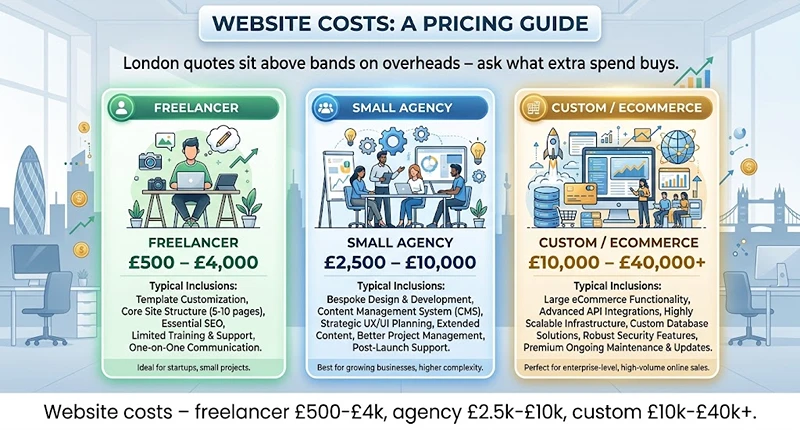
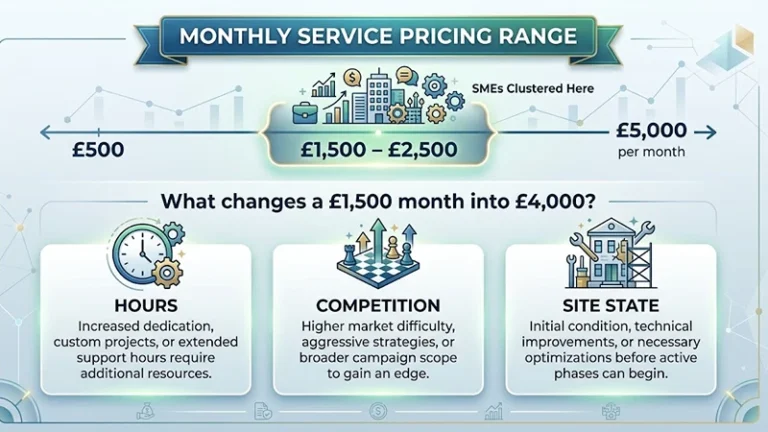
Trend chasing without a budget context is how projects overrun. UK pricing guides often show a wide but steady pattern. A simple brochure site from a freelancer usually costs £500 to a few thousand pounds. A small business site from an agency often costs £5,000 to £10,000. Sites with ecommerce, bookings, or custom integrations often cost five figures. One current UK pricing guide puts freelancer work at roughly £500 to £4,000 for a basic brochure site, small agency work at around £2,500 to £10,000 for a standard business site, and custom or ecommerce builds at £10,000 to £40,000 and beyond. London agency quotes commonly sit above these bands purely on overheads, not necessarily on quality, so it’s worth asking what specifically the extra spend buys before assuming a bigger number means a better website.
FAQ
What are the biggest web design trends for 2026?
Accessibility built in from the start, genuine performance work rather than decorative animation, careful AI powered personalisation, and mobile first layouts. Aesthetic trends like dark mode and bold typography are popular but secondary to these functional shifts.
How much does website design cost in London?
Freelancers typically charge from around £500 up to a few thousand pounds for a basic site. Agencies generally quote £5,000 to £10,000 for a professional small business build, with London specifically often pricing higher than the rest of the UK for comparable work.
Is dark mode still worth adding to a website in 2026?
Yes as an option, but it’s not a ranking or conversion factor by itself. It reduces eye strain for some users and signals a modern feel, so it’s worth offering alongside a light mode rather than replacing one with the other.
What accessibility standard do UK websites legally need to meet?
Public sector websites and apps must meet WCAG 2.2 at level AA under the Public Sector Bodies Accessibility Regulations 2018. Private businesses aren’t bound by that specific law but carry general duties under the Equality Act 2010, and the same WCAG standard is the practical benchmark to work to.
How is AI changing web design?
Beyond generating layouts faster, AI is enabling real time personalisation of content and offers, and it’s starting to read and summarise websites on behalf of users through assistants, which changes how content and structure need to be written.
What is answer engine optimisation, and does it matter for a small business site?
It’s the practice of structuring content, headings and schema markup so AI assistants can read and summarise a site accurately. It matters increasingly, because a growing share of research now happens through an assistant rather than a person browsing directly.
Do UK websites need to be mobile first in 2026?
Effectively yes. The majority of UK site traffic arrives on mobile, and Google’s indexing works primarily from the mobile version of a page, so a design that starts on desktop and gets squeezed onto a phone afterwards puts both usability and rankings at risk.
Next steps
Run your current site through Google’s PageSpeed Insights and fix anything flagged under Core Web Vitals before touching anything decorative. Check colour contrast and keyboard navigation against the W3C’s WCAG 2.2 guidelines. If you handle any customer data for personalisation, review your position against the ICO’s guidance on GDPR before it goes live. And when you brief a redesign, ask any London agency to show you their approach to both points above in writing, not just their portfolio.
Be the first to leave a comment below.