

An SEO audit report is a health check for your website’s visibility on Google. To read one without an SEO background, ignore the headline score at first and focus on three questions: Can search engines access your important pages? Can potential customers understand them? Are the reported problems likely to affect enquiries or sales?
You do not need to understand every line in a 40 page PDF. You do need to know what deserves action.
That distinction matters. Many reports mix serious faults, minor improvements and tool generated warnings in one long list. A red label can look alarming even when it applies to an old blog page nobody visits. Meanwhile, one incorrectly blocked service page could be much more costly.
Google’s published guidance is still refreshingly sensible. Create helpful, reliable content for people, show real experience and expertise, and give visitors a satisfying answer. An audit should help your site meet those standards, not become a shopping list of arbitrary technical tweaks.
Start with the business question
Before reading any score, check what the audit was meant to answer.
A useful report should say which website pages were reviewed, when the crawl took place, what data sources were used and how many URLs were found. An audit based only on a homepage scan cannot reliably judge a 300 page website. Equally, a report built from one automated tool cannot see everything Google sees.
Ask this first. Which issue is stopping the right customer from finding or using the right page?
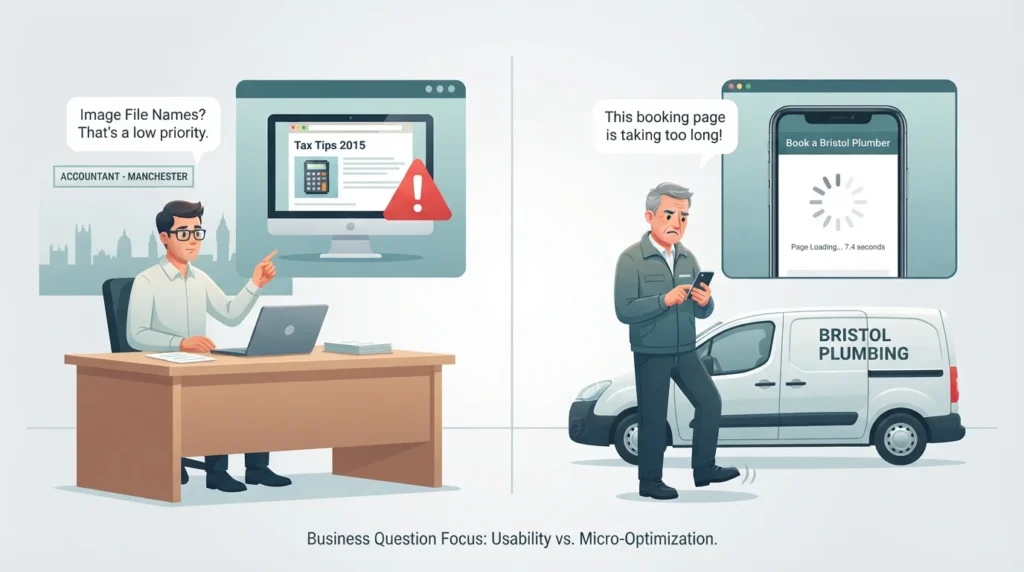
For a Manchester accountant, a missing title on an archived news article is rarely urgent. A noindex tag on the corporation tax service page is. For a Bristol plumber, a few image file names are not the priority if the mobile booking page takes eight seconds to become usable.
In practice, the most common mistake is treating the total number of errors as the verdict. It is not. It is simply a starting point.
Read the report in this order
The order below reflects dependency. There is little value polishing page copy if Google cannot discover or index the page in the first place.
| Report section | What it means in plain English | Why it matters | Treat as a priority when |
|---|---|---|---|
| Crawlability | Whether search engines can reach pages and follow links | Google cannot assess pages it cannot access | Important service, category or location pages are blocked or return errors |
| Indexing | Whether Google is eligible to store and show a page in results | A crawlable page can still be excluded from search results | Valuable pages have noindex tags, incorrect canonicals or duplicate versions |
| Site performance | How quickly pages load and become usable, especially on mobile | Slow pages can frustrate visitors and weaken conversion rates | The issue affects high traffic or lead generating pages |
| On page SEO | Titles, headings, copy and search intent | Helps Google and people understand the page’s purpose | Key pages are vague, duplicated or answer the wrong query |
| Internal linking | Links between your own pages | Shows page relationships and directs authority to important pages | Valuable pages are buried, orphaned or hard to reach |
| Content quality | Whether pages offer useful, original answers | Better content supports relevance, trust and enquiries | Pages are thin, outdated or interchangeable with competitors |
| Backlinks | Other websites linking to yours | Relevant, reputable mentions can support authority | You have serious spam patterns or a clear gap against competitors |
Crawlability comes before rankings
A crawler is software that visits web pages through links and sitemaps. Googlebot is Google’s crawler. If an audit says “blocked by robots.txt”, “404 error”, “server error” or “orphan page”, do not panic. First find out which page is affected.
A 404 means a page no longer exists. That is fine if the page was intentionally removed and had no useful replacement. It becomes a problem when an old service URL still has links, traffic or a close replacement page that should receive a redirect.
What often gets missed is the difference between a crawl issue and an indexing issue. Google may be able to visit a page but choose not to index it because the page is duplicated, very thin, marked noindex or otherwise not suitable to show. Your audit should identify the cause, not just announce that a URL is “not indexed”.
One trap catches many site owners. If a page is blocked in robots.txt, Google cannot crawl it, so it cannot see a noindex tag on that page either. The URL can still appear in results, usually without a description. If you want a page kept out of Google, allow crawling and use noindex instead.
It also helps to compare the audit with the Page indexing report in Google Search Console. A crawler shows what a tool found. Search Console shows how Google itself has processed your URLs.
Treat audit scores cautiously
A website health score is useful for monitoring change over time. It is not a Google ranking score, and it is not a prediction of revenue.
Different tools weigh problems differently. One may score a missing meta description as an error, while another calls it a warning. Neither label tells you whether that page attracts qualified visitors or whether rewriting the description would meaningfully improve clicks.
Use scores like a car dashboard. If the warning light appears, investigate. Do not assume the light tells you the cost of the repair.
A sensible audit will show the affected URLs beside every issue. If it does not, ask for them. You cannot approve work responsibly without knowing whether the finding affects a high value page, an old campaign URL or every page on the site.
Make sense of page speed
Speed reports often include unfamiliar terms such as Largest Contentful Paint, Interaction to Next Paint and Cumulative Layout Shift. Together, Google calls these Core Web Vitals. You do not need to memorise them. Here is what each one asks, in plain English.
| Metric | What it asks | Google’s “good” threshold |
|---|---|---|
| Largest Contentful Paint | When the main visible content appears | 2.5 seconds or less |
| Interaction to Next Paint | Whether the page responds promptly when someone clicks or taps | 200 milliseconds or less |
| Cumulative Layout Shift | Whether buttons or text jump around while the page loads | 0.1 or less |
Google measures these at the 75th percentile of real visits, so a page passes when at least three quarters of visits meet the target. A single slow test result does not automatically mean a failing page.
The useful question is not “Can we get every score green?” It is “Which pages are slow for real mobile visitors, and what is causing it?”
A developer may recommend image compression, a lighter theme, script removal or better hosting. Those can all be valid, but the evidence should point to the problem. Check whether the report uses real visitor data, often called field data, or a one off laboratory test. Both are useful, though they answer slightly different questions.
Read content findings like a customer
Titles, headings, word counts and keywords appear in almost every SEO audit. They matter, but a report should not turn your website into a string of repeated search phrases.
If a title reads “Electrician London | Best Electrician London | London Electrician”, the issue is not merely poor optimisation. It is unhelpful communication. A stronger title tells a person what they can expect, such as “Emergency Electrician in South London | Smith Electrical”.
Be particularly wary of automatic warnings about “thin content”. A short contact page may be perfectly appropriate. A short service page that does not explain pricing approach, areas served, qualifications, what happens next or common customer concerns is another matter.
Google encourages content created primarily for people and asks publishers to consider whether it demonstrates first hand expertise and leaves readers satisfied. For a UK service business, evidence might include clear service processes, named specialists, accurate local coverage, original photos where appropriate, practical answers and transparent constraints.
A simple decision guide
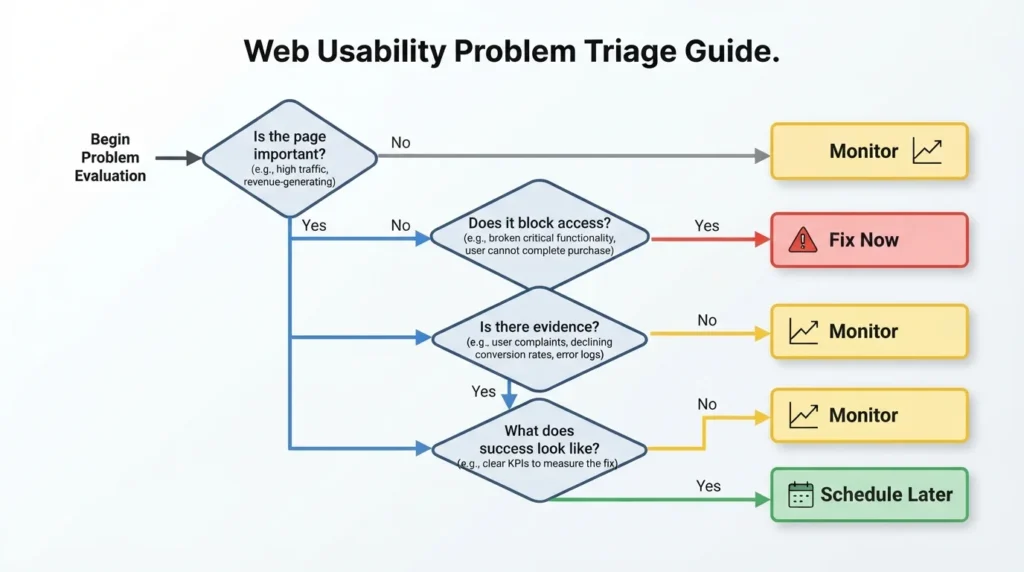
When you reach any item in the audit, run through these four checks before approving work.
| Question | What to check |
|---|---|
| Is the affected page important? | Look for service pages, product categories, location pages and pages already attracting organic visits |
| Can the issue prevent Google or customers from using it? | Indexing blocks, server errors and serious mobile usability faults usually deserve attention before cosmetic changes |
| Is the recommendation supported by evidence? | Ask for affected URLs, screenshots, Search Console data or a clear explanation of the likely effect |
| What will success look like? | A good recommendation should name an owner, expected action and measurement. That may be indexed pages, improved loading time, more impressions, stronger enquiries or fewer errors |
Not every problem needs fixing. Some need monitoring. Others should be fixed during the next planned development release rather than paid for as urgent work.
Questions to ask your agency
A confident agency should welcome these questions.
| Question | Why it matters |
|---|---|
| Which five findings are most likely to affect leads or revenue? | It separates commercially important work from minor maintenance |
| Which URLs are involved and how important are they? | It shows whether the issue affects key pages or low value pages |
| Is this based on Google Search Console, Analytics, a crawler or a manual review? | It helps you understand the evidence behind the recommendation |
| What could happen if we do nothing for three months? | It puts urgency into context |
| Can this be fixed by our developer, content team, or your SEO team? | It makes ownership clear |
| How will we measure whether the change worked? | It creates an accountable outcome |
You are not being difficult by asking. You are making the report useful.
For clarity on contracts, notice periods, and ownership, read about SEO contract notice periods and ownership.
If you would like a second opinion on an audit, Webranko can translate technical findings into a prioritised plan for businesses across the UK. Our SEO audit service focuses on the issues that affect visibility and enquiries, while our local SEO support helps service businesses connect those improvements to the places they actually serve.
Frequently asked questions
What should I look for first in an SEO audit report?
Look first for indexing, crawl and serious usability problems on pages that generate leads or sales. A blocked service page, repeated server error or broken mobile booking journey normally matters more than dozens of missing image descriptions or minor metadata warnings.
Is an SEO score out of 100 important?
An SEO score is useful as a broad benchmark, but it is not a Google score and does not measure business performance directly. Use it to track whether technical hygiene is improving, then judge priorities by affected pages, customer impact, and evidence.
What is the difference between crawling and indexing?
Crawling is Google discovering and visiting a page. Indexing is Google deciding to store that page and make it eligible to appear in search results. A page can be crawled but not indexed if it is duplicated, blocked from indexing, or judged insufficiently useful.
Can I fix SEO audit issues myself?
You can often fix basic items yourself, including unclear titles, broken internal links and outdated page copy. Technical matters like redirects, canonicals, robots rules, structured data, and server responses need care.A quick change can affect more pages than you intended.
How many SEO errors are normal?
There is no normal number because websites differ in size, age, and complexity. More useful than the count is the pattern. Look at whether key pages are affected. Check if the same problem appears across the site. See if issues improve after each release.
How long do SEO audit fixes take to work?
Some technical changes can be crawled and shown within days or weeks. Content and authority improvements often take longer. The timing depends on how quickly Google revisits pages. It also depends on how competitive the search results are. It depends on whether the fix addresses the real cause.
Webranko works with UK businesses to identify the technical, content and performance issues that matter most.
A good SEO audit should leave you clearer, not more anxious. Read it as a prioritised decision document rather than a technical exam. Protect access to your important pages, improve the pages customers rely on, and insist on evidence before spending money on the rest.


Be the first to leave a comment below.