


In-Depth Guide
The Complete Guide to SEO Services
Our specialists have written a comprehensive guide covering strategy, best practices, and the exact approaches we use for our clients.
Compliment a Squarespace site owner on their design and watch them light up. Ask them how much organic traffic that beautiful homepage actually brings in and the mood usually shifts. Squarespace makes gorgeous sites. It doesn’t make them rank on its own, and conflating the two is one of the most common mistakes we see.
The platform gives you genuinely solid on page controls. Editable titles, meta descriptions, alt text, basic structured data, all there. What trips sites up almost every time is the template itself. People choose it for a portfolio gallery look. They do not choose it for fast loading on a mobile connection in Manchester.
Design and Speed Pull in Opposite Directions
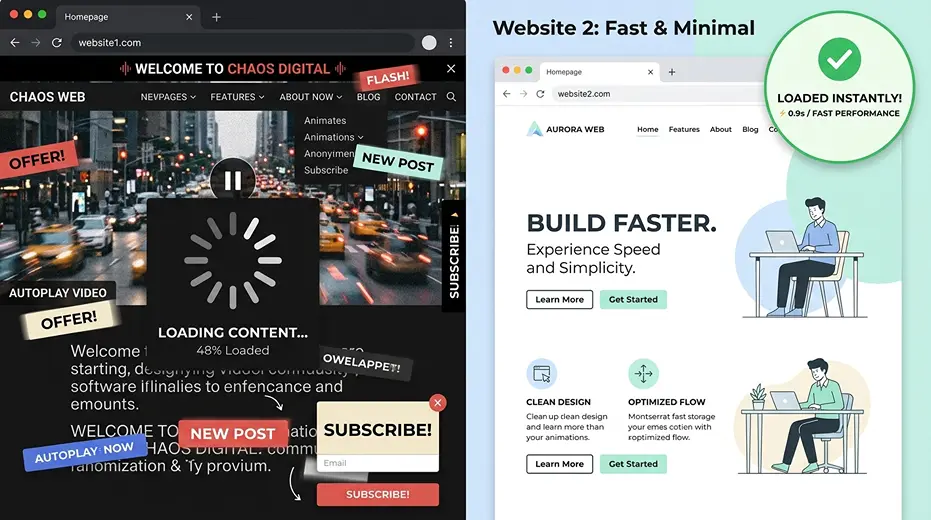
Here’s the tension nobody warns you about at signup. The templates that win design awards tend to be the heaviest ones. Full screen video backgrounds, layered animations, galleries that load dozens of high resolution images before a visitor scrolls past the fold. Every one of those choices costs load time, and load time is a ranking factor Google has been explicit about for years.
A proper technical SEO audit approach applies just as much to Squarespace as it does to any other platform, even though the levers look different. Instead of server configuration and code minification, it’s template choice, animation reduction and image compression doing the heavy lifting. The underlying question stays the same. What’s actually slowing this page down, and does the business need it there at all.
Where Squarespace Sites Typically Lose Speed
| Element | Common Setup | Fixed Approach |
|---|---|---|
| Homepage hero | Autoplay video background | Compressed static image or shorter clip |
| Gallery pages | Full resolution images loading upfront | Compressed images with lazy loading |
| Animations | Applied across every section | Limited to genuinely useful moments |
| Fonts | Multiple custom fonts loaded together | Reduced to what’s actually used |
Most sites we look at sit firmly in that middle column, carrying speed costs nobody ever added up until rankings stalled.
Titles Rarely Get the Attention They Deserve
Squarespace’s default title behaviour is functional, not strategic. Left untouched, most pages end up with a title based only on the page name. Little thought is given to what someone would type into Google first. Fixing this uses the same discipline as any on page SEO project. It is done through Squarespace’s settings panel, not a plugin.
Meta descriptions suffer the same fate. Left blank, Google writes its own summary, and that summary rarely matches what would actually earn a click. Five minutes per page spent writing a proper title and description tends to move the needle more than most technical fixes, simply because so few Squarespace sites bother doing it at all.
Duplicate Content Hides in the Blog Structure
Squarespace’s blog and tag system can quietly generate several URLs covering almost identical content without anyone intending it. A post tagged three different ways can end up competing against itself in search results, splitting whatever authority it would otherwise have built as one strong page.
Catching this early is exactly the kind of thing a proper SEO audit service exists for, because it rarely announces itself as an obvious problem. Rankings just quietly plateau, and the cause sits buried three tags deep in a blog structure nobody’s reviewed since launch.
The WordPress Question Comes Up Constantly
Ask enough Squarespace owners about their SEO frustrations and someone eventually suggests moving to WordPress. Sometimes that’s genuinely the right call, particularly for a business that’s outgrown what a template based platform can offer. Often it isn’t, and the actual fix is far simpler than a full migration.
WordPress SEO services work uses a different toolkit. It needs more code access and deeper plugin control. It also offers more flexibility for larger, complex sites. But for a straightforward business site with a handful of service pages and a blog, that flexibility often goes unused anyway. The better question isn’t which platform ranks better in theory. It’s whether the current site is using what it already has properly.
None of This Matters Without Local Visibility Too
A fast, well optimised Squarespace site still needs to actually appear when someone nearby searches for what the business offers. Site speed and metadata fix the foundation. They don’t replace the need for consistent business information and proper local signals sitting alongside it.
This is where technical fixes need to sit next to genuine local SEO agency thinking rather than being treated as the whole job. A beautifully fast page that never shows up in a local search result still leaves the phone silent.
Getting the Balance Right Without Compromising the Design
None of this asks a business to abandon the design they fell in love with when they picked Squarespace in the first place. It asks for an honest look at which animations and template features are actually earning their place, titles and descriptions written properly instead of left blank, duplicate content caught before it splits ranking signals, and a clear understanding of what Squarespace genuinely allows.
We check Squarespace sites every month that look stunning and rank nowhere. The fix is rarely a platform change. It’s usually a handful of speed adjustments, properly written metadata, and a tidier blog structure, done without touching the design a single bit.