

Skip to content
SEO Services

Magento SEO Services UK: Fixing What Catalogue Growth Quietly Breaks

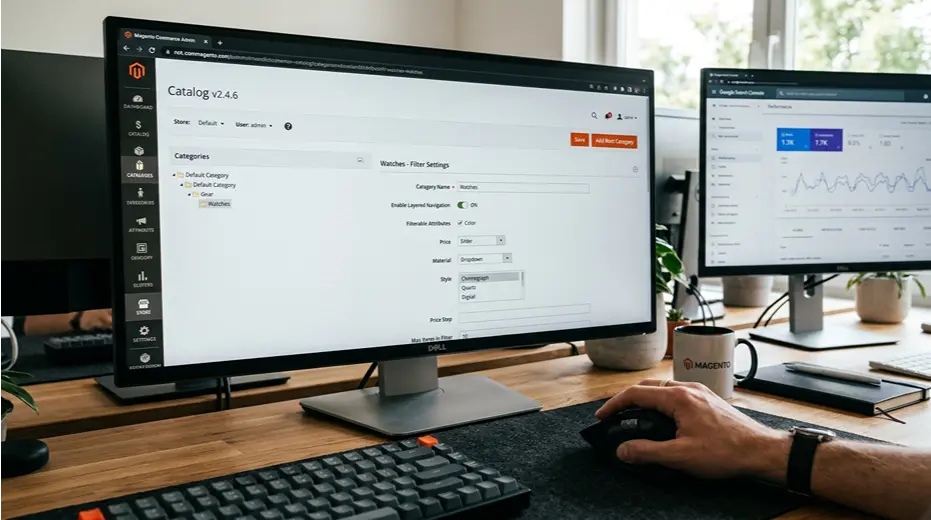
Magento gives large ecommerce businesses lots of flexibility. Most Magento SEO problems come from unmanaged complexity, not limits in the platform. Category and layered navigation can generate thousands of near duplicate URLs without anyone intending it. Page speed drags on catalogue heavy stores running unoptimised extensions. Structured data often exists only where a default theme happened to include it. We work directly with Magento's own architecture, fixing indexing, canonical strategy and speed at the scale a proper Magento catalogue actually needs, rather than applying advice written for a small five page website. q
No lock-in contracts UK-based specialists Core Web Vitals certified
Web Ranko team working on SEO Services
Optimised for the speed and structure issues Magento stores actually have

The Foundation

Why Magento SEO problems are almost always about scale, not the platform

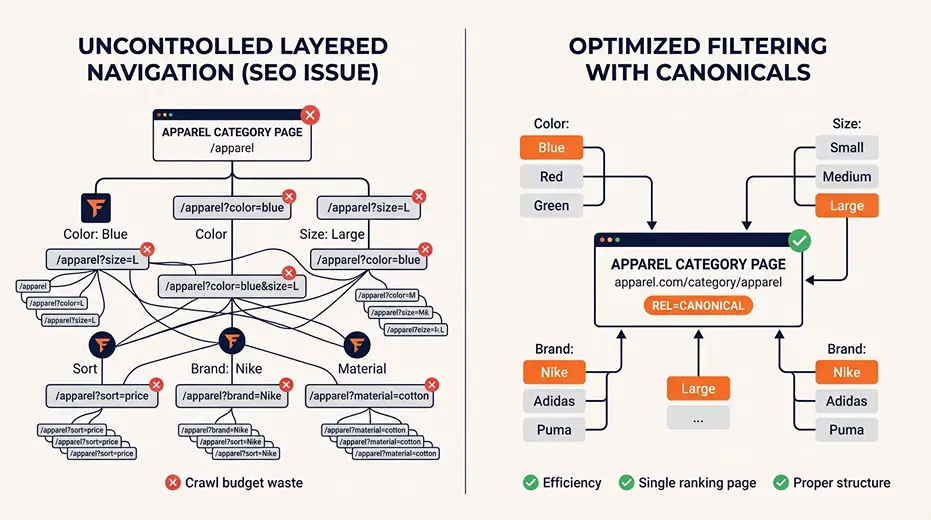
Magento was built for large, complex catalogues, and that complexity is precisely where SEO problems tend to grow unnoticed. Layered navigation, designed to help shoppers filter by size, colour or price, generates a URL for every combination applied. Left unmanaged, a single category with a handful of filters can spawn hundreds of near identical indexable pages, all quietly competing against each other in search rather than concentrating authority on the page that should actually rank.

Page speed follows a similar pattern. A default Magento install performs reasonably well. Add a dozen extensions, an oversized product image library and a theme nobody has properly optimised, and load times climb fast on a catalogue with thousands of products. We start every Magento project by mapping the actual scale of the problem, checking indexing settings, canonical configuration and extension impact together, rather than treating this like a small site with a few pages needing minor tweaks.

Large Magento catalogues generating duplicate URLs through layered navigation
Stores with slow page speed caused by unmanaged extensions and image sizes
Product pages missing structured data despite Magento supporting it properly
Businesses migrating to or from Magento needing SEO continuity through the process
Agencies needing a Magento specific technical SEO specialist for a client store
Web Ranko SEO Services specialist at work

Common issues we fix

Layered navigation generating thousands of duplicate filtered URLs High
Canonical tags missing or misconfigured across category pages High
Page speed dragged down by unmanaged extensions and image sizes High
Product schema missing or incomplete across the catalogue High
Out of stock products left indexed with no clear strategy Med
Sitemap generation not reflecting actual catalogue structure Med
Category descriptions thin or duplicated across similar categories Med
No process for reviewing SEO settings as the catalogue grows Med

What's Included

What's Included in SEO Services

A comprehensive, senior-led service — not a checklist handed to a junior. Here's exactly what you get.

Full Magento Catalogue SEO Audit

We review your entire catalogue structure, checking layered navigation, canonical configuration, indexing settings and extension impact against current Magento SEO best practice.

  • Category and layered navigation review for duplicate URL risk
  • Extension audit for genuine speed and SEO impact
  • Product schema and structured data checked across the catalogue
  • Priority list built around your highest opportunity categories

Canonical and Indexing Strategy

We configure canonical tags and indexing rules properly across filtered and layered navigation, so search engines concentrate ranking signal on the pages that should actually rank.

  • Canonical tags implemented across filtered category views
  • Robots and indexing settings reviewed for the full catalogue
  • Out of stock and discontinued product strategy defined clearly
  • Sitemap structure checked against actual catalogue architecture

Product and Category Schema

Structured data is implemented properly across product and category pages, pulling through pricing, availability and reviews accurately so your listings have the best chance of earning rich results.

  • Product schema implemented across the full catalogue
  • Category schema added where genuinely relevant
  • Review and rating markup configured for eligible products
  • Validated against Google's structured data guidelines

Magento Speed and Extension Optimisation

We identify which extensions and configuration choices are genuinely slowing your store down, and fix or remove them without breaking the functionality your business depends on.

  • Extension by extension review of speed impact
  • Image compression and delivery corrected across the catalogue
  • Core Web Vitals checked against Magento specific benchmarks
  • Caching and indexing configuration reviewed for performance

Category and Product Content Strategy

Thin or duplicated category descriptions are rewritten well. This gives Google a clear reason to separate similar categories. It stops Google treating them as near-identical pages.

  • Category descriptions rewritten around genuine search intent
  • Product content reviewed for depth and duplication risk
  • Internal linking built between related categories and products
  • Content gaps identified across the catalogue

Ongoing Magento SEO Monitoring

A growing catalogue can drift out of SEO consistency quickly as new products, categories and extensions are added. We check your store regularly, so growth does not quietly undermine rankings already won.

  • Regular review of Core Web Vitals and search visibility
  • New categories and products checked for consistency
  • Quick fixes applied when something changes unexpectedly
  • Simple monthly summary of catalogue performance

Why It Matters

Why UK Ecommerce Businesses Choose Webranko for Magento SEO

Most SEO advice online is written for small sites with a handful of pages and applied to Magento catalogues without adjustment. We work at the scale a genuine Magento store operates at, fixing the duplicate content and speed issues that only appear once a catalogue grows large enough to matter.We work at the scale a real Magento store operates at

Web Ranko SEO team collaborating
Get a free SEO Services audit

Built for Catalogue Scale

Every recommendation accounts for layered navigation and thousands of products, not advice written for a five page website.

Duplicate Content Fixed at the Source

We fix the canonical and indexing strategy properly, rather than patching individual pages one at a time.

Structured Data at Catalogue Scale

Product and category schema are implemented across the full catalogue, not just a handful of flagship pages.

Speed Fixed Without Breaking Functionality

We identify what is genuinely slowing your store down without stripping out features your business relies on.

Monitored as the Catalogue Grows

We keep checking as new products and categories are added, so scale does not quietly undermine your rankings.

How We Work

How Webranko Handles Magento SEO Services

A process built around the scale a genuine Magento catalogue operates at, starting with a full audit of your current store structure.

Web Ranko technical SEO team collaborating
Senior-only team. No junior handoffs.
Days 1 to 4

Full Catalogue and Extension Audit

The entire catalogue structure, layered navigation and installed extensions are checked against current Magento SEO capabilities and their speed impact.

Week 1 to 2

Canonical and Indexing Strategy

Canonical tags and indexing rules are configured across filtered and layered navigation, resolving duplicate content risk at the source.

Week 2 to 3

Schema and Structured Data Build

Product, category and review schema are implemented across the catalogue, validated against Google's structured data guidelines.

Week 3 to 4

Speed and Extension Fixes.

Extensions, image delivery and caching configuration are reviewed and corrected to improve Core Web Vitals across the store.

Ongoing

Monitoring and Catalogue Growth Checks

Store performance is checked regularly and adjusted as new products, categories and extensions are added over time.

Real Results

What Happens After a Magento SEO Rebuild

35+ Years combined team experience
5 Stage process from audit to ongoing monitoring
6-8 Weeks before search visibility typically improves
4.9 Rated Excellent Verified Google Reviews Scan to Review

Example quote only, replace with a genuine client testimonial before publishing: Our catalogue had grown to thousands of products over several years and nobody had ever looked at the duplicate URLs our filters were creating. Webranko fixed our canonical strategy and rebuilt our product schema properly, and organic traffic to our category pages picked up within about two months.

Michael Ashworth Ecommerce Manager, a UK Magento built retailer

In-Depth Guide

The Complete Guide to SEO Services

Our specialists have written a comprehensive guide covering strategy, best practices, and the exact approaches we use for our clients.

Ask a Magento store owner why their category pages barely rank and you’ll usually hear a version of the same story. Traffic used to be decent. Then the catalogue grew, filters were added, a few extensions were installed over the years, and somewhere along the way, rankings slid without anyone noticing when.

That story comes up so often because Magento was built to handle scale, and scale is where SEO problems hide. A five page website rarely builds up the kind of technical debt a three thousand product catalogue collects when nobody is actively managing it.

Layered Navigation Creates a Problem Most Store Owners Never See

Here’s the mechanism nobody explains clearly. Layered navigation lets shoppers filter a category by size, colour, price or brand, which is useful for the customer. Each filter combination generates its own URL though, and left unmanaged, a single category can spawn hundreds of near identical indexable pages.

Google sees dozens of URLs showing roughly the same products in a slightly different order, with no clear signal about which one deserves to rank. Authority that should sit on one strong category page gets split across a pile of filtered variations instead.

On a big catalogue there’s a second cost. Googlebot spends its visits crawling filter combinations nobody will ever search for, and new products or updated categories wait longer to be picked up. The fix starts with deciding which filters deserve to exist in search at all, rather than letting Magento make that call by default, and auditing how deep the problem runs before touching a single setting.

Where Duplicate Content Typically Originates on a Magento Store

Source How It Happens Typical Fix
Layered navigation filters Each filter combination generates a new URL Low value combinations kept out of the crawl, and the few filters people actually search for built into proper landing pages
Sorting and pagination Sort order and page number create variant URLs Sort parameters kept out of the index, paginated pages left with their own canonical
Category paths in product URLs The same product opens under every category it sits in Category paths dropped from product URLs so each product has one address
Product variants Colour or size options split across separate URLs Consolidated where possible, canonicalised where not
Multiple store views Same content duplicated across store or language views Hreflang and canonical strategy applied correctly

Each of these compounds on a large catalogue, which is why small site SEO advice rarely fixes a Magento problem.

Extensions and the Theme Are Usually the Real Speed Culprits

Magento store owners often assume the platform itself is slow. Check the actual cause, and it’s usually a stack of extensions installed over several years, each adding a little load time until the combined effect drags page speed down badly.

A proper technical SEO audit on Magento means going through every installed extension and asking whether it’s earning its place, then looking hard at the frontend. The default Luma theme ships a lot of JavaScript, and on a busy category page that shows up in Core Web Vitals. Caching, image delivery and third party scripts fix a lot of it. For some stores a move to a Hyvä frontend is the bigger win, and that rebuild needs SEO planned in from the start so canonicals, schema and URLs survive it.

Product Schema Matters More at This Scale, Not Less

A small ecommerce site with fifty products can get away with adding structured data to each listing by hand. A Magento catalogue running into the thousands cannot, which is why this needs building into the template rather than handled page by page.

This ties into wider ecommerce SEO, where structured data for price, availability and reviews affects how listings appear in Google. Getting it right across an entire catalogue through the template, rather than one product at a time, is the only approach that keeps up as the store grows.

Keyword Strategy Needs to Match Catalogue Depth

A common mistake on large Magento stores is targeting the same broad head terms across dozens of similar categories and leaving valuable long tail searches untouched. Proper keyword research at catalogue scale means mapping search terms against the real depth of your product range, not just picking the obvious phrase for each top level category.

This matters even more once category descriptions come into play. Thin, duplicated descriptions across similar categories give Google little reason to rank one over another, and rewriting them around distinct search intent is often one of the highest impact fixes on a mature catalogue.

Migration Timing Deserves Its Own Attention

Businesses moving to or from Magento face a risk that smaller platform migrations don’t carry in the same way. Losing ranking signal across thousands of URLs during a migration can undo years of organic growth if redirects and canonical strategy aren’t planned before the move.

For stores also trading internationally through multiple store views or currencies, this overlaps with international SEO too. Hreflang and region specific canonicals need planning alongside any migration or restructure, not bolted on afterwards once problems have surfaced.

What Actually Changes Once This Gets Fixed Properly

None of this means ripping out extensions your business relies on or rebuilding the catalogue from scratch. It means a proper audit of layered navigation and canonical setup, an honest look at which extensions are worth their speed cost, structured data built into the templates across the whole catalogue, and category content rewritten around real search intent rather than left thin and duplicated.

We audit Magento stores every month that carry years of technical debt nobody ever dealt with. The catalogue usually isn’t the problem. The unmanaged growth underneath it is, and fixing that tends to unlock ranking gains that have been sitting there for a long time.

FAQ

SEO Services questions, answered honestly

Questions UK ecommerce businesses ask us most before starting a Magento SEO project.

Ask us anything
Why does my Magento store have so many duplicate URLs?

This usually comes from layered navigation, where every filter combination applied to a category generates its own indexable URL. Without proper canonical tags, this can create hundreds of near identical pages competing against each other in search.

Is Magento good for SEO compared to other ecommerce platforms?

Yes, Magento supports strong SEO capability including structured data, canonical control and flexible URL structures. Most problems come from unmanaged scale and unoptimised extensions rather than any limitation in the platform’s actual SEO features.

Why is my Magento store loading slowly?

Slow loading on Magento is usually caused by unoptimised extensions, oversized product images, or caching configuration left on default settings. Reviewing extensions and image delivery often improves speed significantly without changing platform or theme.

Should out of stock products stay indexed on Magento?

It depends on how long they will be unavailable. Temporarily out of stock products can usually stay indexed, while permanently discontinued products are better redirected to a close replacement, or allowed to return a 404 where there isn’t one.

How long does a Magento SEO project take to show results?

It depends on catalogue size, how many store views or languages are involved, and how much of the work is configuration versus template changes. A single store view with a few thousand products is a different job to a multi-region store running separate catalogues. Projects start from £X. We quote a fixed price after the free catalogue audit, so you know the number before committing.

How much does Magento SEO cost?

It depends on catalogue size, how many store views or languages are involved, and how much of the work is configuration versus template changes. A single store view with a few thousand products is a different job to a multi-region store running separate catalogues. Projects start from £499. We quote a fixed price after the free catalogue audit, so you know the number before committing.

Start today

Stop Letting Catalogue Scale Work Against Your Rankings

Every month your Magento store runs on unmanaged layered navigation and unoptimised extensions is search visibility a competitor with a properly structured catalogue is picking up instead. Let's see what your store is missing.

What's in your free audit

Delivered in 48 hours by a senior specialist.

Full catalogue audit against Magento specific technical capabilities
Extension and speed review across your entire store
Priority list built around your highest opportunity categories
No lock in contract, support scales with the size of your catalogue